Langkah Extract/Menggabungkan File ber-PART | Langkah Resume Download dengan Idm
Langkah Download | Via Datafilehost | Via Firedrive | Via Shared | Via Solidfiles | Via 1fichier | Via Filecloud | Via Tusfiles
Showing posts with label Nokia. Show all posts

Tuesday, July 17, 2012

MXBOX v3.5 revision 2.3

v3.5 revision 2.3, Public-Release

CHANGES:


Nokia module updated to version 2.3

- added: BB5 security repair function by USB for
Meego/HARMATTAN device (N9-00, RM-696)
Works standalone with HTI connected
(FIRST IN THE WORLD NO INTERNET NEED IT)
Required HTI FW version 00.50 or later
This function includes:
- SX4 AUTH
- SD REPAIR
- SL3 BF HASH CALC
- SL3 NCK CALC

Full PM backup/restore for Meego/HARMATTAN device required
phone SX4 Auth (No, its not readonly)

- added: Full flashing support for Meego/HARMATTAN device
(including EMMC)

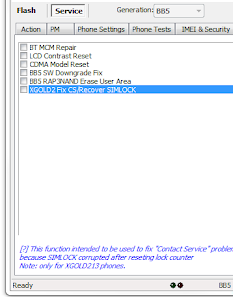
- added: Quick Fix for XGOLD2 Fix CS/Recover SIMLOCK
(This will recover SIMLOCK table caused by Reset LOCK counter)

- added: Latest flash Update version 12.14.001.4

- bugfixed: Reset Lock counter on XGOLD213 causing SIMLOCK corrupted

- minor bug fixed


SL3 Logger updated to version 2.3

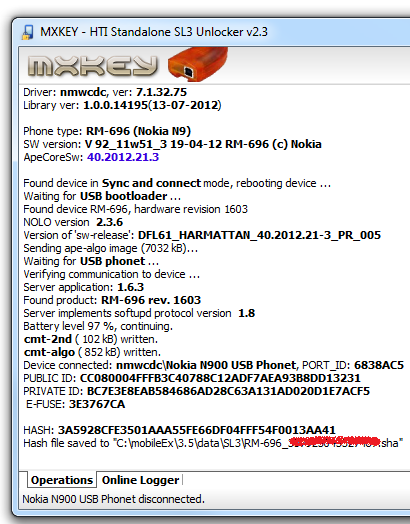
- added: Support for Meego/HARMATTAN device (N9-00, RM-696) by USB

- bugfixed: Reset Lock counter on XGOLD213 causing SIMLOCK corrupted

- minor bug fixed


SL3 Bruteforce

- added: New configuration for oclHashcat-lite-0.10


Some screenshots:


Download links for MXBOX v3.5 revision 2.3


Download mobileEx_setup_v3.5_rev2.3(20120713).exe

Tuesday, July 3, 2012

ATF Update v8.95 - Nokia N9 SP Unlock support

A New EXE Update v8.95 has been uploaded to the ATF Server.

How to use ATF AUTO-UPDATE Feature [Tutorial]

1. Make Sure "Automatically Check for Updates" is Checked...

This image has been resized. Click this bar to view the full image. The original image is sized 800x597.


2. Restart ATF Exe, and you will get POP-UP Message Like this:

This image has been resized. Click this bar to view the full image. The original image is sized 800x597.

*** Click YES ***


3. You can check the Download Status on ANY of the tabs in "Product Support"
This image has been resized. Click this bar to view the full image. The original image is sized 800x597.


4. After Software restarts, you now have the NEW VERSION but you might need to "UPDATE IMPORTANT FILES" if necessary.
This image has been resized. Click this bar to view the full image. The original image is sized 800x597.


5. "UPDATE IMPORTANT FILES" if necessary.

This image has been resized. Click this bar to view the full image. The original image is sized 800x597.


6. After ALL Necessary Files are updated, Restart ATF EXE and Enjoy the New Update!

Thursday, June 14, 2012

Infinity Box [ BEST ] 1.47 released

BEST v1.47

- USB flashing improved
- BB5 USB loaders updated to v12.14.0
- Added QSD based phones flashing support (Lumia 900 and same)
- Added MDM part flashing support (Lumia 900 and same)
- File checking improved before flashing (QC,INF)

- Service operations improved
- Restore SL improved
- Added support for new types
- splitted sl30/sl3 support under test
- SPR reading improved
- RPL operations improved
- RPL read/write revised on all supported generations/interfaces

- Other
- VPL parser updated for WP phones
- Added only 1/309 write option in Write PM
- Server sx4 improved
- S60vX sms extraction was broken, fixed

- Stuff files updated
- PM collection revised
- Ini updated and revised
- Some interface changes
- some bugfixes

Download   :  BEST_v1.47.rar

Sunday, April 8, 2012

Tips atau cara penggunaan MXkey yg baik

* 1. Pastikan memilih Platform yg benar (DCT4 atau BB5) sebelum memulai.

* 2. Gunakan "Scan" untuk menangani ponsel yg tidak mati, hal ini membantu mobileEx dalam menentukan setting spesifik yg benar untuk ponsel yg dihubngkan dengan box.

* 3. "BUS Check" dengan setting safe flash dicentang, akan perform boot squence, menampilkan informa booting (upp id, flash manufacture, flash address) dan otomatis mem-backup rpl.

* 4. Pastikan ponsel dalam keadaan mode yg benar dalam menjalankan operasional FBUS/NON flashing,
- contoh: pada jendela Tuning & Testing, ponselharusnya dalam TEST MODE, selain itu akan lebih baik jika ponsel dalam keadaan LOCAL MODE.
Pindah mode secara manual jika dibutuhkan.

* 5. Saat mengerjakan ponsel dalam kondisi hidup, untuk semua perbaikan (ganti bahasa, Unlock dsb), DCT4 and BB5, akan lebih baik untuk selalu mem-backup security data (RPL, certificate, pm, dsb) sebelum melakukan repair.

* 6. Jika anda perhatikan, ada perbedaan dari speed flashing antara FlashID/Manufacturer dimana pilihan 'Fast flash' seharus tidak berlaku untuk chip flash "INTEL".

* 7. Jika hanya mengganti bahasa, pilih file setting ke NORMAL. dan centang 'Language Only"

* 8. "Safe Flash" akan mem-backup RPL dari flash mode, dan saat ini TIDAK support untuk ponsel dengan ASIC type 11, JANGAN centang. Untuk ponsel ini, lakukan backup PM selama backup RPL dari flash mode belum support. Semea DCT4 selain itu telah support. Yup, walaupun ponsel mati.

* 9. Gunakan tombol "Restart" jika hendak me-refresh koneksi atau restart ponsel dan software.

* 10. Unlock "Security Code" pada semua DCT4,DCT4PLUS(Asic 2),WD2, TIKU tanpa kehilangan user data(phonebook, msg, dsb) meskipun counter sudah di block? Yup, sangat mungkin dengan mobileEx. Hanya klik "BUS Check" dan akan tampil "Master Code" , gunakan code sebagai security code(code ini dibaca dariponsel dan 100% berfungsi untuk CDMA atau GSM).


-----------------------
Setting Software
-----------------------
Configurasi Nokia Tool

Buka Nokia Service Tool, dan klik di pojok sini


* Enabled Imei changes -> jika dicentang Imei/Esn changes akan berfungsi.
sebaik cek hukum yg berlaku ditempat anda.

* Auto backup ... -> Backup RPL saat BUS check (DCT4)

* Auto Create DP folder if not exist
Ini untuk membuat direktori untuk .nfp extract. Dalam folder ini kan berisi mcu, ppm, and cnt.

* Default FBUS timeout
Ini akan mengatur FBUS timeout (value lebih tinggi = lebih lambat tapi lebih akurat)

* Highlight market item
Akan menunjukan market yg dipilih. Contoh gambar, menunjukkan Indo, APAC, MD, and -X.
Akan terlihat seperti ini saat memlih file berdasarkan product code

Server : ini tool untuk kalkulasi ask ke rpl. Pilih salah satu yg paling cepat dari lokasi anda.

Setting untuk lokasi direktori firmware default


Menggunakan SAFE Erase

Sejak v3.2 revision 5.0, Public-Release
Telah di release feature baru bagian dari tool Erase Flash .

Code:

...............
~ SAFE Erase will Protect PM Data from erase specially when doing 'Erase WHOLE flash'.
~ Usefull for recovering a DEAD phone without loosing SIMLOCK DATA

dinamakan -> SAFE Erase.
Artinya Erase Flash area "TANPA" menghapus PM Data Area ( include Simlock ).


Contoh:
kasus 5300 RM-146 yg dapat local mode
pertama backup RPL dan PM


Jika tidak dapat local mode, dengan cara ini, kita dapat mem-backup RAP NPC ( dengan memiih RAP )
langkah ini tidak membutuhkan local mode.


Lakukan Erase Flash.
Jangan lupa centang Safe Erase Flash ..


Setelah proses erase selesai, buka tab flashing .
flash dengan firmware yg sesuai.

Ini info ponsel setelah proses flashing ..
jika sebelumnya ponsel tidak mengalami kerusakan, maka ponsel akan normal.


tinggal restore RPL/RAP NPC RPL backup diatas..
Write PM yg area 308 telah diremove dengan SX4
Langkah Unlock BB5 SL2


Sebelum unlock, lakukan ful backup RPL dan PM
minimal Backup IMEI + PM308

Contoh boot check dengan UFSxHWK
.


Dan ini saat di BUS Check menggunakan mobileEx dengan versi 3.3


Coba dengan memilih flash loader jika mengalami masalh sepeti ini.
Hal ini juga berlaku untuk kasus DCT4 "BootLoader not responding, mostly RAM problem !"


Repair SUPERDONGLE

phone info

Code:

Phone Type: RM-303 (Nokia 5310 XpressMusic)
SW Version: V 10.10 23-03-09 RM-303 (c) Nokia
Imei plain: andra
Product Code: 0558573
Language Pack:
- not available.

SIMLOCK seems to be valid
SUPERDONGLE_KEY invalid!
- WD timer enabled, phone will reboot itself after 3 min.
SIMLOCK_TEST passed
SECURITY_TEST passed


Imei net: andra
Version: SIMLOCK SERVER
Provider: Nokia Test, Country: Finland
Counter: 0/3, 0/10

CONFIG_DATA: 2440700000000000
PROFILE_BITS: 0000000000000000

BLOCK 1: 1=OPEN 2=OPEN 3=OPEN 4=OPEN 5=OPEN, DATA=FFFFFF
BLOCK 2: 1=OPEN 2=OPEN 3=OPEN 4=OPEN 5=OPEN, DATA=FFFFFF
BLOCK 3: 1=OPEN 2=OPEN 3=OPEN 4=OPEN 5=OPEN, DATA=FFFFFF
BLOCK 4: 1=OPEN 2=OPEN 3=OPEN 4=OPEN 5=OPEN, DATA=FFFFFF
BLOCK 5: 1=OPEN 2=OPEN 3=OPEN 4=OPEN 5=OPEN, DATA=FFFFFF
BLOCK 6: 1=OPEN 2=OPEN 3=OPEN 4=OPEN 5=OPEN, DATA=FFFFFF
BLOCK 7: 1=OPEN 2=OPEN 3=OPEN 4=OPEN 5=OPEN, DATA=FFFFFF


repair SUPERDONGLE

Code:

Product: V 10.10 23-03-09 RM-303 (c) Nokia


SYSTEM ASIC ID: 000000010000022600010006010C192101013000

ROOT KEY HASH: BAF3A9C3DBFA8454937DB77F2B8852B1
ROM ID: 273F6D55DFAAF68F
Sending SecondaryBoot ...OK
Sending PreLoader ...OK
Sending CustomLoader ...OK

Calculating SUPERDONGLE using security server ...

Connecting to server[main.mxkey.biz] ...OK, secure login ...
Completed in 9.484 s

RPL saved to "C:\mobileEx\3.3\data\backup\BB5_RM-303_andra_SD.RPL"

Updating SUPERDONGLE_KEY ...OK

scan


Code:


Phone Type: RM-303 (Nokia 5310 XpressMusic)

SW Version: V 10.10 23-03-09 RM-303 (c) Nokia
Imei plain: mm
Product Code: 0558573
Language Pack:
- not available.

SIMLOCK seems to be valid

SUPERDONGLE_KEY seems to be valid
SIMLOCK_TEST passed
SECURITY_TEST failed!


Imei net: mm

Version: SIMLOCK SERVER
Provider: Nokia Test, Country: Finland
Counter: 0/3, 0/10

CONFIG_DATA: 2440700000000000

PROFILE_BITS: 0000000000000000

BLOCK 1: 1=OPEN 2=OPEN 3=OPEN 4=OPEN 5=OPEN, DATA=FFFFFF

BLOCK 2: 1=OPEN 2=OPEN 3=OPEN 4=OPEN 5=OPEN, DATA=FFFFFF
BLOCK 3: 1=OPEN 2=OPEN 3=OPEN 4=OPEN 5=OPEN, DATA=FFFFFF
BLOCK 4: 1=OPEN 2=OPEN 3=OPEN 4=OPEN 5=OPEN, DATA=FFFFFF
BLOCK 5: 1=OPEN 2=OPEN 3=OPEN 4=OPEN 5=OPEN, DATA=FFFFFF
BLOCK 6: 1=OPEN 2=OPEN 3=OPEN 4=OPEN 5=OPEN, DATA=FFFFFF
BLOCK 7: 1=OPEN 2=OPEN 3=OPEN 4=OPEN 5=OPEN, DATA=FFFFFF


DO "SUPER SD AUTH"

Code:

Product: V 10.10 23-03-09 RM-303 (c) Nokia


SYSTEM ASIC ID: 000000010000022600010006010C192101013000

ROOT KEY HASH: BAF3A9C3DBFA8454937DB77F2B8852B1
ROM ID: 273F6D55DFAAF68F
Sending SecondaryBoot ...OK
Sending PreLoader ...OK
Sending CustomLoader ...OK

Restarting phone ...

Connecting to server[main.mxkey.biz] ...OK, secure login ...
Authenticating to SUPERDONGLE using security server ...
SUPERDONGLE authorized !

write full PM yg area 308 telah dibuang


Code:


Writing PM from Node ...

Section: 1
- Key: 0, size 12 bytes written.
- Key: 2, size 70 bytes written.
- Key: 3, size 70 bytes written.
- Key: 4, size 70 bytes written.
- Key: 6, size 276 bytes written.
- Key: 7, size 276 bytes written.
- Key: 8, size 276 bytes written.
- Key: 10, size 384 bytes written.
- Key: 11, size 384 bytes written.
- Key: 12, size 384 bytes written.
- Key: 14, size 384 bytes written.
- Key: 15, size 384 bytes written.
- Key: 16, size 384 bytes written.
- Key: 17, size 32 bytes written.
- Key: 19, size 16 bytes written.
....
....
kepanjangan..
....
....
Section: 365
- Key: 0, size 2 bytes written.
- Key: 1, size 12 bytes written.
- Key: 2, size 36 bytes written.
- Key: 3, size 36 bytes written.
- Key: 4, size 36 bytes written.
- Key: 5, size 36 bytes written.
- Key: 6, size 36 bytes written.
- Key: 7, size 40 bytes written.
- Key: 8, size 40 bytes written.
- Key: 9, size 40 bytes written.
- Key: 10, size 40 bytes written.
- Key: 11, size 40 bytes written.
- Key: 12, size 40 bytes written.
- Key: 13, size 40 bytes written.
- Key: 14, size 40 bytes written.
Completed in 58.796 s

PM auth dan SUPER SD Auth


PM auth
fungsinya untuk menulis pm 1 dan 309 (melalui otorisasi dari sx4 card)
pada saat tombol ini di tekan sx4 card akan memeriksa npc data(IMEI) dan superdongle data
jika keduanya masih asli dari nokia dan keduanya sinkron maka kita dapat menulis pm 1 dan 309
tentunya setelah sx4 card memeriksa SD dan NPCnyaz(IMEI)


SUPER SD Auth
fungsinya juga untuk menulis pm 1 dan 309
perbedaan dengan pmAuth, tombol ini digunakan untuk menulis pm1 dan 309 setelah kita melakukan repair SD
tapi yg perlu di ketahui bahwa SD yg di tuliskan bukanlah SD asli dari nokia yang kita kenal dlm ask2rpl
tapi merupakan custom dari coder dgn hasil yg sangat memuaskan bagi kita para tekhnisi
jadi setiap kita habis merepair SD lalu kita coba pm Auth hasilnya pasti superdongle error mengapa? (jawabannya diatas)
SUPER SD Auth juga bisa di gunakan utk HP dengan Original SD atau SD habis di repair oleh tool lain, kecuali di HP SL3, karena itu namanya pake 'SUPER".


dengan penjelasan yang masih banyak kurangnya di atas
semoga dapat membantu teman2 semua dalam merepair SD
soalnya banyak yang tanya mengapa setelah repair sd, security failed tekan pm Auth hasilnya sd error...???
jawabannya : karena yg harusnya ditekan SUPER SD Auth bukan PM Auth adapun klo error juga
saran saya.. cek koneksi anda apa sudah cukup bagus hehe...


Repair BB5 yg mengalami error PM Area
(write PM308 dari HP lain, PM308kosong, ...)

Setelah ada pembenahan dari server, sekarang perbaikan SD berjalan dengan baik.

Prosedur nya sebagai beikut..
Ini berlaku untuk semua ponsel (SL1, SL2) dengan berbagai kerusakan PM area, kecuali RPL NPC rusak (IMEI 123456....).
Ini HANYA memperbaiki SD (bukan Simlock)

1. Write full PM dari type ponsel yg SAMA (tidak peduli apakan berisi area 1, 120, 308, 309)
2. Lakukan Simlock RPL repair
3. lakukan SD RPL repair
4. lakuan SUPER SX4 Auth kemudian write PM1 and PM309 dari type ponsel yg SAMAl
5. Pada kasusu tertentu (jika ponsel yang pernah mengalami kesalaha write RPL) lakukan write RPL CCC, HWC, VARIANT dari type ponsel yang SAMA,
Penanganan jika Recovery via Server tidak berfungsi...

Ini hanya cara Alaternatif dan selalu ada cara untuk menjadi lebih mudah dengan mxkey.

Ini semua sebenarnya tentang recovery HWC.

Scan

Code:

Phone Type: RM-237 (Nokia 3110c)
SW Version: V 07.21 05-11-08 RM-237 (c) Nokia.
Imei plain: 35322503273286-5
Product Code: 0514959
Language Pack:
- not available.

SIMLOCK seems to be valid
SUPERDONGLE_KEY seems to be valid
SIMLOCK_TEST passed
SECURITY_TEST failed!

TimeStamp: 2008-11-12T09:25:55Z
SW Version: 07.21
Variant Version: 014
ProductProfile: RM237_0514959_07.21_014.spr
Simlock: 0514959_simlock.bin

Imei net: 353225032732865
Version: SIMLOCK SERVER VERSION 63
Provider: Nokia Test, Country: Finland
Counter: 0/3, 0/10

CONFIG_DATA: 2440700000000000
PROFILE_BITS: 0000000000000000

BLOCK 1: 1=OPEN 2=OPEN 3=OPEN 4=OPEN 5=OPEN, DATA=FFFFFF
BLOCK 2: 1=OPEN 2=OPEN 3=OPEN 4=OPEN 5=OPEN, DATA=FFFFFF
BLOCK 3: 1=OPEN 2=OPEN 3=OPEN 4=OPEN 5=OPEN, DATA=FFFFFF
BLOCK 4: 1=OPEN 2=OPEN 3=OPEN 4=OPEN 5=OPEN, DATA=FFFFFF
BLOCK 5: 1=OPEN 2=OPEN 3=OPEN 4=OPEN 5=OPEN, DATA=FFFFFF
BLOCK 6: 1=OPEN 2=OPEN 3=OPEN 4=OPEN 5=OPEN, DATA=FFFFFF
BLOCK 7: 1=OPEN 2=OPEN 3=OPEN 4=OPEN 5=OPEN, DATA=FFFFFF

BB5 Secure Storage Validation
Service > Phone Test > Various > BB5 Secure Storage Validation

Code:

SIMLOCK seems to be valid
SUPERDONGLE_KEY seems to be valid
SIMLOCK_TEST passed
SECURITY_TEST failed!

Q: Kenapa setelah write pm dengan SX4 masih berakhir dengan security failed?
A: Tolong cek HP dengan feature ini.

BB5 Certivicate Validation
Service > Phone Test > Various > BB5 Certivicate Validation

Code:

RAP Data :
SYSTEM ASIC ID: 000000010000022600010006010C192101001101 [RAPGSM ver: 1.1]
EM0 ID: 00000232
EM1 ID: 00000353
PUBLIC ID: 094002010DA07E5652111A03CFD2350DD48AD044
ASIC MODE ID: 00
ROOT KEY HASH: BAF3A9C3DBFA8454937DB77F2B8852B1
ROM ID: 191EC665DFAAF68F
SecondaryBoot: rap3gv3_2nd.fg [BB5] version: 1.30.0 revision: 0.0 size: 0x3C00
Supported RAP Ids: 0103192101003000, 010C192101003000, 0103192101013000, 010C192101013000, 0103192101003100, 010C192101003100, 0303192101023000,

030C192101023000, 0303192101033000, 030C192101033000, 0103192101001101, 010C192101001101, 0003192101001002, 000C192101001002, 0013192101001002,

001C192101001002
FlashID0: 0089 8981 - 0000 0000 [Intel NU48F256,256 Mbits] type: NOR,RAP
ExtBUSC: 0000 0000 0000 0000 0000 0000 0000 0000
ExtDEVC: FFFF 0000 - 0000 0000
Algorithm: RAP3Gv3_algo_131.fg [BB5 ALGORITHM] version: 1.31.0 revision: 0.0 size: 0x297E0
Supported RAP Ids: 0103192101003000, 010C192101003000, 0103192101013000, 010C192101013000, 0103192101003100, 010C192101003100, 0303192101023000,

030C192101023000, 0303192101033000, 030C192101033000, 0003192101002000, 000C192101002000, 0003192101002100, 000C192101002100, 0003192101002200,

000C192101002200, 0003192101012200, 000C192101012200, 0103192101001101, 010C192101001101, 0003192101001002, 000C192101001002, 0013192101001002,

001C192101001002
RAP PAPUBKEYS HASH: C0E691EA16A7593A9BB28832D7312A39F7ED668D
Reading RAP NPC (0x168 bytes)
Original Product Code: 0514959
Reading RAP VARIANT (0x0 bytes)
Reading RAP CCC (0x160 bytes)
Product Code: 0514959
CCC seems to be valid
Reading RAP HWC (0x0 bytes)
HWC empty !

Recover CERT
Service > Imei Rebuild > Recover CERT

Code:

RAP Data :
SYSTEM ASIC ID: 000000010000022600010006010C192101001101 [RAPGSM ver: 1.1]
EM0 ID: 00000232
EM1 ID: 00000353
PUBLIC ID: 094002010DA07E5652111A03CFD2350DD48AD044
ASIC MODE ID: 00
ROOT KEY HASH: BAF3A9C3DBFA8454937DB77F2B8852B1
ROM ID: 191EC665DFAAF68F
SecondaryBoot: rap3gv3_2nd.fg [BB5] version: 1.30.0 revision: 0.0 size: 0x3C00
Supported RAP Ids: 0103192101003000, 010C192101003000, 0103192101013000, 010C192101013000, 0103192101003100, 010C192101003100, 0303192101023000,

030C192101023000, 0303192101033000, 030C192101033000, 0103192101001101, 010C192101001101, 0003192101001002, 000C192101001002, 0013192101001002,

001C192101001002
FlashID0: 0089 8981 - 0000 0000 [Intel NU48F256,256 Mbits] type: NOR,RAP
ExtBUSC: 0000 0000 0000 0000 0000 0000 0000 0000
ExtDEVC: FFFF 0000 - 0000 0000
Algorithm: RAP3Gv3_algo_131.fg [BB5 ALGORITHM] version: 1.31.0 revision: 0.0 size: 0x297E0
Supported RAP Ids: 0103192101003000, 010C192101003000, 0103192101013000, 010C192101013000, 0103192101003100, 010C192101003100, 0303192101023000,

030C192101023000, 0303192101033000, 030C192101033000, 0003192101002000, 000C192101002000, 0003192101002100, 000C192101002100, 0003192101002200,

000C192101002200, 0003192101012200, 000C192101012200, 0103192101001101, 010C192101001101, 0003192101001002, 000C192101001002, 0013192101001002,

001C192101001002
RAP PAPUBKEYS HASH: C0E691EA16A7593A9BB28832D7312A39F7ED668D
Reading RAP NPC (0x168 bytes)

Begin Certificate Request ...
Connecting to server ...OK, Login ...
Query done with status: OK
Updating PRODUCTCODE (0514959)... OK
RAP Data :
SYSTEM ASIC ID: 000000010000022600010006010C192101001101 [RAPGSM ver: 1.1]
EM0 ID: 00000232
EM1 ID: 00000353
PUBLIC ID: 094002010DA07E5652111A03CFD2350DD48AD044
ASIC MODE ID: 00
ROOT KEY HASH: BAF3A9C3DBFA8454937DB77F2B8852B1
ROM ID: 191EC665DFAAF68F
SecondaryBoot: rap3gv3_2nd.fg [BB5] version: 1.30.0 revision: 0.0 size: 0x3C00
Supported RAP Ids: 0103192101003000, 010C192101003000, 0103192101013000, 010C192101013000, 0103192101003100, 010C192101003100, 0303192101023000,

030C192101023000, 0303192101033000, 030C192101033000, 0103192101001101, 010C192101001101, 0003192101001002, 000C192101001002, 0013192101001002,

001C192101001002
FlashID0: 0089 8981 - 0000 0000 [Intel NU48F256,256 Mbits] type: NOR,RAP
ExtBUSC: 0000 0000 0000 0000 0000 0000 0000 0000
ExtDEVC: FFFF 0000 - 0000 0000
Algorithm: RAP3Gv3_algo_131.fg [BB5 ALGORITHM] version: 1.31.0 revision: 0.0 size: 0x297E0
Supported RAP Ids: 0103192101003000, 010C192101003000, 0103192101013000, 010C192101013000, 0103192101003100, 010C192101003100, 0303192101023000,

030C192101023000, 0303192101033000, 030C192101033000, 0003192101002000, 000C192101002000, 0003192101002100, 000C192101002100, 0003192101002200,

000C192101002200, 0003192101012200, 000C192101012200, 0103192101001101, 010C192101001101, 0003192101001002, 000C192101001002, 0013192101001002,

001C192101001002
RAP PAPUBKEYS HASH: C0E691EA16A7593A9BB28832D7312A39F7ED668D
Updating CMT NPC ...OK
Updating CMT CCC ...OK
Updating CMT HWC ...failed, Result: 06C0000000117200
Certificate programmed successfully !

Di kasus ini, HANYA diperlukan write HWC certificate.
Contoh menggunakan HWK, pilih HWC cert dari HP YANG SAMA.

Sayangnya, Kadang kita gak punya HP yg bagus buat di backup CRT partialy dengan MXKey.

Hanya punya koleksi backups dari HWK .
Kita bisa membaca HWC CRT dari HWK tsb dengan MXKey:
Service > Imei & Security > Imei Rebuild > Backup RPL > Section - Drop down, Select HWC only from a good phone.

Catatan:
Di kasus ini, HWC hilang. Cek dengan detail di kasus anda
Logs dari UFSxHWK:

Code:

Certificate: Rm-237_351963038604637_1027200951214_HWCCmt.bin
CER FLASH ERASE OK, Time: 00:01
CER FLASH WRITE OK, Time: 00:00
Written: 1 Certificate(s)
Certificate(s) Write Done

Tes lagi,
Service > Phone Test > Various > BB5 Certivicate Validation

Code:

RAP Data :
SYSTEM ASIC ID: 000000010000022600010006010C192101001101 [RAPGSM ver: 1.1]
EM0 ID: 00000232
EM1 ID: 00000353
PUBLIC ID: 094002010DA07E5652111A03CFD2350DD48AD044
ASIC MODE ID: 00
ROOT KEY HASH: BAF3A9C3DBFA8454937DB77F2B8852B1
ROM ID: 191EC665DFAAF68F
SecondaryBoot: rap3gv3_2nd.fg [BB5] version: 1.30.0 revision: 0.0 size: 0x3C00
Supported RAP Ids: 0103192101003000, 010C192101003000, 0103192101013000, 010C192101013000, 0103192101003100, 010C192101003100, 0303192101023000, 030C192101023000, 0303192101033000, 030C192101033000, 0103192101001101, 010C192101001101, 0003192101001002, 000C192101001002, 0013192101001002, 001C192101001002
FlashID0: 0089 8981 - 0000 0000 [Intel NU48F256,256 Mbits] type: NOR,RAP
ExtBUSC: 0000 0000 0000 0000 0000 0000 0000 0000
ExtDEVC: FFFF 0000 - 0000 0000
Algorithm: RAP3Gv3_algo_131.fg [BB5 ALGORITHM] version: 1.31.0 revision: 0.0 size: 0x297E0
Supported RAP Ids: 0103192101003000, 010C192101003000, 0103192101013000, 010C192101013000, 0103192101003100, 010C192101003100, 0303192101023000, 030C192101023000, 0303192101033000, 030C192101033000, 0003192101002000, 000C192101002000, 0003192101002100, 000C192101002100, 0003192101002200, 000C192101002200, 0003192101012200, 000C192101012200, 0103192101001101, 010C192101001101, 0003192101001002, 000C192101001002, 0013192101001002, 001C192101001002
RAP PAPUBKEYS HASH: C0E691EA16A7593A9BB28832D7312A39F7ED668D
Reading RAP NPC (0x168 bytes)
Original Product Code: 0514959
Reading RAP VARIANT (0x0 bytes)
Reading RAP CCC (0x160 bytes)
Product Code: 0514959
CCC seems to be valid
Reading RAP HWC (0xD4 bytes)
Product Code: 0514959
HWC seems to be valid

Dari SCAN, masih terlihat Security failed

Code:

Phone Type: RM-237 (Nokia 3110c)
SW Version: V 07.21 05-11-08 RM-237 (c) Nokia.
Imei plain: 35322503273286-5
Product Code: 0514959
Language Pack:
- not available.

SIMLOCK seems to be valid
SUPERDONGLE_KEY seems to be valid
SIMLOCK_TEST passed
SECURITY_TEST failed!

TimeStamp: 2008-11-12T09:25:55Z
SW Version: 07.21
Variant Version: 014
ProductProfile: RM237_0514959_07.21_014.spr
Simlock: 0514959_simlock.bin

Imei net: 353225032732865
Version: SIMLOCK SERVER VERSION 63
Provider: Nokia Test, Country: Finland
Counter: 0/3, 0/10

CONFIG_DATA: 2440700000000000
PROFILE_BITS: 0000000000000000

BLOCK 1: 1=OPEN 2=OPEN 3=OPEN 4=OPEN 5=OPEN, DATA=FFFFFF
BLOCK 2: 1=OPEN 2=OPEN 3=OPEN 4=OPEN 5=OPEN, DATA=FFFFFF
BLOCK 3: 1=OPEN 2=OPEN 3=OPEN 4=OPEN 5=OPEN, DATA=FFFFFF
BLOCK 4: 1=OPEN 2=OPEN 3=OPEN 4=OPEN 5=OPEN, DATA=FFFFFF
BLOCK 5: 1=OPEN 2=OPEN 3=OPEN 4=OPEN 5=OPEN, DATA=FFFFFF
BLOCK 6: 1=OPEN 2=OPEN 3=OPEN 4=OPEN 5=OPEN, DATA=FFFFFF
BLOCK 7: 1=OPEN 2=OPEN 3=OPEN 4=OPEN 5=OPEN, DATA=FFFFFF


Langkah terakhir,
SX4 Online - PMM auth


Code:

Connecting to server ...OK
Scanning local SX4 Card ...
No SX4 Card found.
Authenticating using security server ...
Connecting to server[main.mxkey.biz] ...MXKEY-SX4 ver 2.5(ID), hello 114.127.220.142
SUPERDONGLE auth succeeded!

Write PM

Code:

Writing PM from Node ...
Section: 1
- Key: 0, size 114 bytes written.
dst....
Section: 2
- Key: 0, size 432 bytes written.
Section: 4
- Key: 1, size 64 bytes written.
dst...
Section: 8
- Key: 0, size 12 bytes written.
dst...
Section: 11
- Key: 0, size 4 bytes written.
dst...
Section: 12
- Key: 0, size 102 bytes written.
Section: 13
- Key: 1, size 2 bytes written.
dst..
Section: 14
- Key: 0, size 6 bytes written.
Section: 31
- Key: 4, size 12 bytes written.
Section: 42
- Key: 0, size 2 bytes written.
dst...
Section: 50
- Key: 0, size 2 bytes written.
Section: 51
- Key: 4, size 74 bytes written.
Section: 54
- Key: 0, size 2 bytes written.
- Key: 2, size 24 bytes written.
Section: 55
- Key: 0, size 80 bytes written.
- Key: 1, size 2 bytes written.
Section: 56
- Key: 0, size 4 bytes written.
- Key: 1, size 4 bytes written.
Section: 58
- Key: 0, size 51 bytes written.
dst...
Section: 59
- Key: 0, size 68 bytes written.
dst...
Section: 60
- Key: 0, size 95 bytes written.
dst...
Section: 61
- Key: 0, size 62 bytes written.
dst....
Section: 62
- Key: 1, size 15 bytes written.
- Key: 3, size 15 bytes written.
- Key: 4, size 15 bytes written.
Section: 63
- Key: 0, size 14 bytes written.
dst...
......................... (kepanjangan)
Section: 339
- Key: 0, size 511 bytes written.
- Key: 1, size 511 bytes written.
Section: 341
- Key: 3, size 4 bytes written.
- Key: 4, size 4902 bytes written.
Completed in 21.954 s

Selesai..

Code:

Phone Type: RM-237 (Nokia 3110c)
SW Version: V 07.21 05-11-08 RM-237 (c) Nokia.
Imei plain: 35322503273286-5
Product Code: 0550691
Language Pack:
- not available.

SIMLOCK seems to be valid
SUPERDONGLE_KEY seems to be valid
SIMLOCK_TEST passed
SECURITY_TEST passed


Imei net: 353225032732865
Version: SIMLOCK SERVER VERSION 63
Provider: Nokia Test, Country: Finland
Counter: 0/3, 0/10

CONFIG_DATA: 2440700000000000
PROFILE_BITS: 0000000000000000

BLOCK 1: 1=OPEN 2=OPEN 3=OPEN 4=OPEN 5=OPEN, DATA=FFFFFF
BLOCK 2: 1=OPEN 2=OPEN 3=OPEN 4=OPEN 5=OPEN, DATA=FFFFFF
BLOCK 3: 1=OPEN 2=OPEN 3=OPEN 4=OPEN 5=OPEN, DATA=FFFFFF
BLOCK 4: 1=OPEN 2=OPEN 3=OPEN 4=OPEN 5=OPEN, DATA=FFFFFF
BLOCK 5: 1=OPEN 2=OPEN 3=OPEN 4=OPEN 5=OPEN, DATA=FFFFFF
BLOCK 6: 1=OPEN 2=OPEN 3=OPEN 4=OPEN 5=OPEN, DATA=FFFFFF
BLOCK 7: 1=OPEN 2=OPEN 3=OPEN 4=OPEN 5=OPEN, DATA=FFFFFF
Full repair dengan Firmware ENO, hanya butuh NPC CERT

Saat menerima HP dengan kondisi ini, ini akan sangan mudah di tangani dengan MXKEY

Code:

Phone Type: RM-243 (Nokia 6120)
SW Version: V 07.10 15-07-09 RM-243 (c) Nokia
Imei plain: 35571202019489-1
Product Code: 0547930
ApeCoreSw: 07.10
ApeVariant: rofs_version_inforofx_version_info
ApeTest: rm243_ENO_A_2009wk15v0.100
Language Pack:
- not available.

SIMLOCK invalid!
SUPERDONGLE_KEY seems to be valid
SECURITY_TEST failed!


SIMLOCK_DATA corrupted!


1. Pertama backup Certificate first. HANYA NPC area.
BB5 > Servie > Imei & Security - Select NPC from drop down menu.

Code:

...
NPC_DATA saved OK
RPL saved to "C:\Documents and Settings\Satu\Desktop\setool\BB5_35571202019489_BA CK_NPC.rpl"

2. Lakukan FULL ERASE dengan whole flash.
BB5 > Flash > Advanced, Get Addr, jangan centangSAFE Erase

3. Flash HP dengan file yg sesuai. (ENO (jika dibutuhkan), MCU, PPM, etc)
Dalam kasus ini, pilih Firmare yg support untuk rebuid simlock, kadang dibutuh Firmware dengan versi yg ledih RENDAH.

Code:

Using device: UFS_USB V2.8 (c) SarasSoft 2007.
Library version: 1.0.0.11985, Date: 03-02-2010
Processing file: rm243_ENO_x_2008wk32v0.010.fpsx as MCU
[BB5,XSR 1.5] size: 5.08 MB
dst....
.........
Programming completed in 26.344 s
Flashing completed in 39.938 s


Phone Type: RM-243 (Nokia 6120)
SW Version: Vp 04.53 14-02-08 RM-243 (c) Nokia
Imei plain: 12345610654321-?
Language Pack:
- not available.

SIMLOCK invalid!
SUPERDONGLE_KEY invalid!
- WD timer enabled, phone will reboot itself after 3 min.
SECURITY_TEST passed


Imei plain is invalid !!!
SIMLOCK_DATA corrupted!
Total time to process is 59.282 s

4. Flash MCU SAJA, dengan versi yg sama dengan firmware ENO, yg di flash pertama kali.

Code:

...
...........
Programming completed in 3 min 45.219 s
Flashing completed in 3 min 56.390 s


Phone Type: RM-243 (Nokia 6120)
SW Version: V 05.11 21-04-08 RM-243 (c) Nokia
Imei plain: 12345610654321-?
ApeCoreSw: 05.11
ApeVariant: rofs_version_info
ApeTest: rm243_ENO_x_2008wk32v0.010
Language Pack:
- not available.

SIMLOCK invalid!
SUPERDONGLE_KEY invalid!
- WD timer enabled, phone will reboot itself after 3 min.
SECURITY_TEST passed


Imei plain is invalid !!!
SIMLOCK_DATA corrupted!

Total time to process is 4 min 15.000 s

5. Selanjutnya restore Certificate. Write NPC Backup.

Code:

....
.....
NPC verified Ok.
Updating CMT NPC ...OK
Certificate programmed successfully !

Phone Type: RM-243 (Nokia 6120)
SW Version: V 05.11 21-04-08 RM-243 (c) Nokia
Imei plain: 35571202019489-1
ApeCoreSw: 05.11
ApeVariant: rofs_version_info
ApeTest: rm243_ENO_x_2008wk32v0.010
Language Pack:
- not available.

SIMLOCK invalid!
SUPERDONGLE_KEY invalid!
- WD timer enabled, phone will reboot itself after 3 min.
SECURITY_TEST failed!


SIMLOCK_DATA corrupted!

6. REPAIR SIMLOCK - HP categori SL2, hajar ajah

> centang PA_SL2
> Pilih Repair SIMLOCK
> Centang make SIMLOCK RPL
> klik Repair SPLock

Code:

SIMLOCK_DATA corrupted!
...
......
Calculating SIMLOCK using security server ...
Connecting to server[main.mxkey.biz] ...OK, secure login ...
Completed in 44.515 s

RPL saved to "C:\mobileEx\3.3\data\backup\BB5_RM-243_355712020194891_SIM.RPL"
Updating SIMLOCK...OK

Reading Simlock info ...
Imei net: 355712020194891
Version: SIMLOCK SERVER
Provider: Nokia Test, Country: Finland
Counter: 0/3, 0/10

CONFIG_DATA: 2440700000000000
PROFILE_BITS: 0000000000000000

BLOCK 1: 1=OPEN 2=OPEN 3=OPEN 4=OPEN 5=OPEN, DATA=FFFFFF
BLOCK 2: 1=OPEN 2=OPEN 3=OPEN 4=OPEN 5=OPEN, DATA=FFFFFF
BLOCK 3: 1=OPEN 2=OPEN 3=OPEN 4=OPEN 5=OPEN, DATA=FFFFFF
BLOCK 4: 1=OPEN 2=OPEN 3=OPEN 4=OPEN 5=OPEN, DATA=FFFFFF
BLOCK 5: 1=OPEN 2=OPEN 3=OPEN 4=OPEN 5=OPEN, DATA=FFFFFF
BLOCK 6: 1=OPEN 2=OPEN 3=OPEN 4=OPEN 5=OPEN, DATA=FFFFFF
BLOCK 7: 1=OPEN 2=OPEN 3=OPEN 4=OPEN 5=OPEN, DATA=FFFFFF

7. REPAIR SD

Code:

...
.....
Sending SecondaryBoot ...OK
Sending PreLoader ...OK
Sending CustomLoader ...OK

Calculating SUPERDONGLE using security server ...
Connecting to server[main.mxkey.biz] ...OK, secure login ...
Completed in 44.422 s

RPL saved to "C:\mobileEx\3.3\data\backup\BB5_RM-243_355712020194891_SD.RPL"
Updating SUPERDONGLE_KEY ...OK

8. Sekarang cek Certificate dengan Certificate Validation Tool
BB5 > Service > Phone Test > Various > BB5 Certificate Validation

Dikasus ini, HP tidak terdapat CCC and HWC, selanjutnya:

Write CLONE RPL

Code:

...
.....
Updating CMT CCC ...OK
Updating CMT HWC ...OK
Certificate programmed successfully !

Phone Type: RM-243 (Nokia 6120)
SW Version: V 05.11 21-04-08 RM-243 (c) Nokia
Imei plain: 35571202019489-1
ApeCoreSw: 05.11
ApeVariant: rofs_version_info
ApeTest: rm243_ENO_x_2008wk32v0.010
Language Pack:
- not available.

SIMLOCK seems to be valid
SUPERDONGLE_KEY seems to be valid
SECURITY_TEST failed!


Imei net: 355712020194891
Version: SIMLOCK SERVER
Provider: Nokia Test, Country: Finland
Counter: 0/3, 0/10

CONFIG_DATA: 2440700000000000
PROFILE_BITS: 0000000000000000

BLOCK 1: 1=OPEN 2=OPEN 3=OPEN 4=OPEN 5=OPEN, DATA=FFFFFF
BLOCK 2: 1=OPEN 2=OPEN 3=OPEN 4=OPEN 5=OPEN, DATA=FFFFFF
BLOCK 3: 1=OPEN 2=OPEN 3=OPEN 4=OPEN 5=OPEN, DATA=FFFFFF
BLOCK 4: 1=OPEN 2=OPEN 3=OPEN 4=OPEN 5=OPEN, DATA=FFFFFF
BLOCK 5: 1=OPEN 2=OPEN 3=OPEN 4=OPEN 5=OPEN, DATA=FFFFFF
BLOCK 6: 1=OPEN 2=OPEN 3=OPEN 4=OPEN 5=OPEN, DATA=FFFFFF
BLOCK 7: 1=OPEN 2=OPEN 3=OPEN 4=OPEN 5=OPEN, DATA=FFFFFF

9. Lakukan SUPER SD Auth, dan write PM.
Load PM > Suped SD Auth

Code:

Using device: UFS_USB V2.8 (c) SarasSoft 2007.
Library version: 1.0.0.11985, Date: 03-02-2010

Product: V 05.11 21-04-08 RM-243 (c) Nokia
ApeCoreSw: 05.11

SYSTEM ASIC ID: 000000010000022600010006400C192101021103 [RAPIDO3G ver: 1.11]
ROOT KEY HASH: CAEEBB65D3C48E6DC73B49DC5063A2EE
ROM ID: A8C1D6713E691FF8
Sending SecondaryBoot ...OK
Sending PreLoader ...OK
Sending CustomLoader ...OK

Restarting phone ...
Connecting to server[main.mxkey.biz] ...
Connecting to server[main.mxkey.biz] ...OK, secure login ...
Authenticating to SUPERDONGLE using security server ...
SUPERDONGLE authorized !
Writing PM from Node ...
Section: 1
- Key: 0, size 114 bytes written.
- Key: 1, size 4 bytes written.
dst....
...........
Section: 334
- Key: 0, size 1 bytes written.
Section: 354
- Key: 0, size 13 bytes written.
Section: 356
- Key: 0, size 2 bytes written.
Completed in 7.454 s

10. Langkah terakhir,Flash dengan Firmware versi yg tinggi.
Code:

Code:

...
......
Flash programming ...
Programming completed in 7.735 s
Flashing completed in 6 min 36.953 s


Phone Type: RM-243 (Nokia 6120)
SW Version: V 07.10 15-07-09 RM-243 (c) Nokia
Imei plain: 35571202019489-1
Product Code: 0547930
ApeCoreSw: 07.10
ApeVariant: rofs_version_inforofx_version_info
ApeTest: rm243_ENO_A_2009wk15v0.100
Language Pack:
- not available.

seems to be valid
SUPERDONGLE_KEY seems to be valid
SECURITY_TEST passed


Imei net: 355712020194891
Version: SIMLOCK SERVER
Provider: Nokia Test, Country: Finland
Counter: 0/3, 0/10

CONFIG_DATA: 2440700000000000
PROFILE_BITS: 0000000000000000

BLOCK 1: 1=OPEN 2=OPEN 3=OPEN 4=OPEN 5=OPEN, DATA=FFFFFF
BLOCK 2: 1=OPEN 2=OPEN 3=OPEN 4=OPEN 5=OPEN, DATA=FFFFFF
BLOCK 3: 1=OPEN 2=OPEN 3=OPEN 4=OPEN 5=OPEN, DATA=FFFFFF
BLOCK 4: 1=OPEN 2=OPEN 3=OPEN 4=OPEN 5=OPEN, DATA=FFFFFF
BLOCK 5: 1=OPEN 2=OPEN 3=OPEN 4=OPEN 5=OPEN, DATA=FFFFFF
BLOCK 6: 1=OPEN 2=OPEN 3=OPEN 4=OPEN 5=OPEN, DATA=FFFFFF
BLOCK 7: 1=OPEN 2=OPEN 3=OPEN 4=OPEN 5=OPEN, DATA=FFFFFF
Total time to process is 6 min 55.953 s

Semua selesai dengan 10 langkah.
Cara ini bisa dilakukan di HP yg tidak bisa di full backup. (tidak bisa read PM, tidak local mode, blank screen, etc)


!! JANGAN LAKUKAN PADA SL3 !!

JIKA HP dalam simlock corrupted, intinya harus dibersihkan dahulu. HP tsb PM error
Cara mudahnya:
Backup NPC > Erase > Reflash > Restore NPC > Rebuild Simlock > Pm auth, write pm. sudah deh


X3-02 Hardware Solutions


Indahnya saling berbagi.............!!!!!!!!

Saturday, April 7, 2012

Solusi Nokia 5800_5233_5230 Getar aja

Hanya berbagi solusi utk Nokia 5800_5233_5230 di on cuma getar aja....silahkan dinikmati....


All NOKIA Schematics

NOKIA Schematics
-------------------------------------
1XXX
1100 - 1110 - 1112 - 1200 - 1600 - 1616 - 1650 - 1680c
2XXX
3XXX
5XXX
5000 - 5130 - 5140 - 5140i - 5200 - 5300 - 5210 - 5220 - 5230 - 5310 - 5320 - 5500 - 5530 - 5610d - 5630 - 5700 - 5730 - 5800
6XXX
7XXX
7200 - 7210 - 7210s - 7230 - 7250 - 7250i - 7260 - 7270 - 7280 - 7310s7360 - 7370 - 7373 - 7380 - 7390 -7500 - 7510s - 7600 - 7610 - 7610s7650 - 7710 - 7900 - -
8XXX
8210 - 8250 - 8290 - 8310 - 8600 - 8800 - SIR 8800 - 8800Arte - 8850
9XXX
CXXX
C3 - C5 - C6 - C7
EXXX
E5 - E50 - E51 - E52 - E55 - E60 - E61 - E61i - E63 - E65 - E66 - E70 - E72 - E71 - E75 - E90
NXXX
N-gage - N-gage QD - N70 - N71 - N72 - N73 - N76 - N77 - N78 - N79 - N80 - N81 - N81-8GB - N82 - N85 - N86 - N90 - N91 -N92 - N93 - N93i - N95 - N95-8GB - N96 - N97 - N97 mini - N900
Xxxx
X2 - X3 - X5 - X6

Monday, April 2, 2012

....::::Apakah BB5 ENO (ENGINE SOFTWARE)::::....

Apa ENO software Itu:
ENO software menangani semua fungsi dasar di dalam device (hape). File ENO wajib di flashing pada device ketika Memory Combonya berubah dikarenakan:
1. Downgrade Hape yang salah prosedur
2. Flashing dengan Firmware yang salah
3. Erase phone dengan file yang salah atau hape dalam keadaan white screen / blank dispaly.

Setelah Flash dengan Firmware ENO hape anda akan kembali normal dan kemudian dengan mudah melakukan flashing ulang dengan firmware package yg sesuai dengan type / model hape yang ditangani, saran saya pilihlah code product yang sesuai pula berdasarkan pilihan andadan teken flash buttonnya.

Bagaimana Menggunakannya:
- Install ENO_engine_software
- Pastikan Hape terkoneksi dengan baik
- Open JAFF Tool
- Switch to BB5 Tab
- Select Manual Flash and USE INI
- Select your model and ini
- Cari dan pilih
"xxxxx ENO" Product Code
- Teken Flash button, Software akan memulai Flash procedure. . .
- Ketika done successfully kemudia Full Flash dengan product code yg sesuai type ponsel dan semuanya akan berjalan normal dengan hasil maknyus


My Collection ENO Firmware and Upload By Requesting:

ini beberapa type hape yg menggunakan ENO
RM-159_dp_N95-1_ENO_x_2007wk16v0.220
RM-223_dp_N81-3_ENO_x_2007wk24v0.070
RM-179_dp_N81-1_ENO_x_2007wk24v0.070
RM-230_dp_5700_ENO_x_2007wk24v0.010
RM-235_dp_N78-1_ENO_x_2008wk09v0.010
RM-244_dp_E51-1_ENO_07w08.1_100.15.37v020
RM-313_dp_N82_RM-ENO_x_2008wk06updv0.030
RM-320_dp_N95-2_ENO_x_2007wk45v0.020
RM-328_dp_6220c-1ENO_x_2008wk21v0.020
RM-333_dp_N85-1_ENO_x_2008wk41v0.030
RM-333_dp_N85-1_ENO_x_2009wk20v0.A014
RM-334_dp_N85-3_ENO_x_2008wk41v0.030
RM-334_dp_N85-3_ENO_x_2009wk20v0.A014
RM-343_dp_E66-1_ENO_0741.10_100.71.821.3.N22
RM-346_dp_E71-1_ENO_0741.10.N32
RM-346_dp_E71-1_ENO_0741.18wk42.a34
RM-346_dp_E71-1_ENO_0741.18wk42.a36
RM-348_dp_N79-1_ENO_x_LvRuRC3
RM-356_dp_5800d-1_ENO_x_2008wk42v0.033.fpsx
RM-367_dp_6210s-1_ENOx0838v0.010
RM-387_dp_6220c-5_ENO_x__2008wk25v0.010
RM-409_dp_5320d-1_ENO_x_2.22v0.110
RM-409_dp_5320d-1_ENO_x_2.22v0.140
RM-417_dp_5320d-1b_ENO_x_2.22v0.090
RM-422_dp_6124c-1_ENO_x_2008wk15v0.010
RM-431_dp_5630d-1_ENOx0925v0.010
RM-437_dp_E63-1_ENO_008.07.45_100.71.844.1.011
RM-437_dp_E63-1_ENO_008.07.45_100.71.920.a01
RM-493_dp_E71-5_ENO_0741.10_100.71.844.1.a10
RM-494_dp_E66-5_ENO_0741.10_100.71.844.1.a10
RM-505_dp_N97-1_ENOA09w14v0.020

Friday, March 30, 2012

MXBOX v3.5 revision 1.9

ATF ULTRA v8.60 Update !! 29 MAR 2012!!


Advance Turbo Flasher v8.60


ATF Box New Firmware LogiCore 10.3.12 Official Release

--> Fixes SD Card Slot Issues on ATF Big Chrome Boxes
--> Enables the use of ATF SD Card Cable Accessory for ATF Lightning and Nitro Boxes
--> More Stable FBUS Flashing for RAP3Gv30 Phones
--> 13% Speed Increase in Nitro FBUS Flashing
--> 5% Speed Increase in USB Flashing (BB5, Infineon, MAEMO and MEEGO)

ATF New Driver for New Firmware

--> New More Stable FTDI Driver Set for better Operation when used with other GSM Boxes


Rapido "Boom Boom Pow" Update

--> (Boom) First in the World RAPIDO Full RPL Certificates (NPC, HWC, CCC and R&D) Backup via USB Cable Only
--> (Boom) First in the World RAPIDO Full Flash Chip Reading via USB Cable Only
--> (Pow ) RAPIDO Phone Authorize using ATF Network via USB Cable Only*

ATF BB5 Software Enhancements:

--> BUSCheck Button in USB Mode is now Enabled for ALL New Generation Single CPU BB5 and Infineon Phones**
--> Backup RPL Button in USB Mode is now Enabled for ALL New Generation Single CPU BB5**
--> Write RPL via USB is now Enabled for ALL BB5 RAPIDO Phones (RAPIDOYAWEH not Supported)
--> Write RPL via USB is now Enabled for ALL BB5 RAP3Gv40 Phones
--> Write RPL via USB is now Enabled for ALL BB5 RAPUYAMA v1.1 Phones
--> Write RPL via USB is now Enabled for ALL BB5 RAPUYAMA v2.1 Phones
--> Write RPL via USB is now Enabled for ALL BB5 BCM21351 Phones (Broadcom)
--> Custom Erase Flash Chip via USB is now Enabled for ALL BB5 RAPIDO Phones (RAPIDOYAWEH not Supported)
--> Custom Erase Flash Chip via USB is now Enabled for ALL BB5 RAP3Gv40 Phones
--> Custom Erase Flash Chip via USB is now Enabled for ALL BB5 RAPUYAMA v1.1 Phones
--> Custom Erase Flash Chip via USB is now Enabled for ALL BB5 RAPUYAMA v2.1 Phones
--> Custom Erase Flash Chip via USB is now Enabled for ALL BB5 BCM21351 Phones (Broadcom)
--> Permanent Memory Area (PM) is now Initialized Before Writing
--> Upto 7 Flash Files can now be displayed with Scrolling Down the Flash File List
--> VPL Details are now Displayed in the Main Log Window
--> New button "Check" can now be used to determine whether your Downloaded Flash files are corrupted or not
--> Added Force 64K CNT Page is now Available in both FBUS and USB Connections
--> Original SX4 Server is now updated and fixed to v1.50 Protocol
--> Software Logs for USB Flashing Phone #2 is now Saved
--> Software Logs for SD BF is now Saved
--> New Feature Decrypt PM 308 will decrypt all PM 308 blocks and save it into a file

Micro SD Card Brute Force Module Update:

--> Speed Cap for SD Card Bruteforce is Now Removed (Now you can BF with MAXIMUM SD CARD SPEED***)
--> Fixed Bug on Detecting Lock Status of some "non standard" Cards
--> Enabled Option to use ATF SD Card Cable

General Software Bug Fixes:

--> Enable Logging Option in Settings --> General Settings is now Enabled
--> Fixed Bug of UI Crashing when Flash File List is double-clicked
--> Super Dongle Keys are now Checked Before getting access to use the Original SX-4 Server
--> Enabled WinUSB Driver detection and installation upon Program Start-Up

Other Updates:

--> Updated New Phone Models inside Nokia.ini

Notes:

* ATF Network Activation is Required for Authorizing RAPIDO Phones via USB Connection
** Single CPU means that the BB5 Phone does not have a separate APE CPU.
Examples of Dual CPU Phones: N95-8GB, 6630, N90, E90
Rap3Gv3 Phones are not supported for USB Buscheck as well (5130c, 3110c, 7210c, 6300c)
*** SD Card BF Speed Depends on the Actual SD Card. Speeds may vary
from 45 passwords per second to 25,000 passwords per second.


__________________________________________________ ________________________


ATF ULTRA v8.60 Update!! Public Discussion Thread:


ATF [Advance Turbo Flasher] official web sites:
International - http://www.advance-box.com/

ATF [Advance Turbo Flasher] official support forums:
World Wide: Advance Turbo Flasher - GSM-Forum
Indonesia: ATF (Advance Turbo Flasher))
Philippine: Gsmph
Syria: Arabic Support (Syria) GsmVIP
Chinese support forum : ATF Box
Vietnam: Saigonmobile
India: Advance Box - .:: GsmIndia ::.
Official Iran Support Forum : ASANGSM FORUM
Bangladesh: Advance Box - Dhaka Mobile
Chinese Support forum : www.yananliuhuan.com
previous home
Copyright © 13 Januari 2012 - 16 Juni 2014 phs tracent. All Rights Reserved.
Template by : phs tracent. Contact us: Click Here